Engineering at Anthropic
Anthropic 工程团队
We recently released Claude Code, a command line tool for agentic coding. Developed as a research project, Claude Code gives Anthropic engineers and researchers a more native way to integrate Claude into their coding workflows.
我们最近发布了 Claude Code,一个用于代理式编程的命令行工具。作为一项研究项目开发,Claude Code 为 Anthropic 的工程师和研究人员提供了一种更自然的方式,将 Claude 集成到他们的编程工作流程中。
Claude Code is intentionally low-level and unopinionated, providing close to raw model access without forcing specific workflows. This design philosophy creates a flexible, customizable, scriptable, and safe power tool. While powerful, this flexibility presents a learning curve for engineers new to agentic coding tools—at least until they develop their own best practices.
Claude Code 有意设计得低级且不带有偏见,提供接近原始模型访问,而不会强制特定的工作流程。这种设计理念创造了一个灵活、可定制、可脚本化且安全的强大工具。虽然强大,但这种灵活性对于初次接触代理式编程工具的工程师来说,至少在发展出自己的最佳实践之前,会带来一个学习曲线。
This post outlines general patterns that have proven effective, both for Anthropic’s internal teams and for external engineers using Claude Code across various codebases, languages, and environments. Nothing in this list is set in stone nor universally applicable; consider these suggestions as starting points. We encourage you to experiment and find what works best for you!
本文概述了一些已被证明有效的通用模式,这些模式既适用于 Anthropic 的内部团队,也适用于使用 Claude Code 在不同代码库、语言和环境中的外部工程师。列表中的任何内容都不是固定不变或普遍适用的;将这些建议视为起点。我们鼓励你进行实验,找到最适合你的方法!
Looking for more detailed information? Our comprehensive documentation at claude.ai/code covers all the features mentioned in this post and provides additional examples, implementation details, and advanced techniques.
想了解更多详细信息?我们的全面文档在 claude.ai/codecover 涵盖了本文中提到的所有功能,并提供了额外的示例、实现细节和高级技巧。
1. Customize your setup 1. 自定义你的设置
Claude Code is an agentic coding assistant that automatically pulls context into prompts. This context gathering consumes time and tokens, but you can optimize it through environment tuning.
Claude Code 是一个自动将上下文拉入提示的智能编码助手。这种上下文收集会消耗时间和 token,但你可以通过环境调优来优化它。
a. Create CLAUDE.md files a. 创建 CLAUDE.md 文件
CLAUDE.md is a special file that Claude automatically pulls into context when starting a conversation. This makes it an ideal place for documenting:
CLAUDE.md 是一个特殊文件,Claude 在开始对话时会自动将其拉入上下文。这使得它成为记录的理想场所:
- Common bash commands 常见的 bash 命令
- Core files and utility functions
核心文件和工具函数 - Code style guidelines 代码风格指南
- Testing instructions 测试说明
- Repository etiquette (e.g., branch naming, merge vs. rebase, etc.)
仓库礼仪(例如,分支命名、合并与变基等) - Developer environment setup (e.g., pyenv use, which compilers work)
开发者环境设置(例如,pyenv use,哪些编译器可用) - Any unexpected behaviors or warnings particular to the project
项目特有的任何意外行为或警告 - Other information you want Claude to remember
你想让 Claude 记住的其他信息
There’s no required format for CLAUDE.md files. We recommend keeping them concise and human-readable. For example:
CLAUDE.md 文件没有要求的格式。我们建议保持它们简洁且人类可读。例如:
# Bash commands
- npm run build: Build the project
- npm run typecheck: Run the typechecker

# Code style
- Use ES modules (import/export) syntax, not CommonJS (require)
- Destructure imports when possible (eg. import { foo } from 'bar')

# Workflow
- Be sure to typecheck when you’re done making a series of code changes
- Prefer running single tests, and not the whole test suite, for performance
You can place CLAUDE.md files in several locations:
你可以将 CLAUDE.md 文件放在以下几个位置:
- The root of your repo, or wherever you run
claudefrom (the most common usage). Name itCLAUDE.mdand check it into git so that you can share it across sessions and with your team (recommended), or name itCLAUDE.local.mdand.gitignoreit
你的仓库根目录,或者你运行claude的位置(最常用的用法)。将其命名为CLAUDE.md并提交到 git 中,以便跨会话和与团队共享(推荐),或者将其命名为CLAUDE.local.md并.gitignore它 - Any parent of the directory where you run
claude. This is most useful for monorepos, where you might runclaudefromroot/foo, and haveCLAUDE.mdfiles in bothroot/CLAUDE.mdandroot/foo/CLAUDE.md. Both of these will be pulled into context automatically
你运行claude的任何父目录。这对于单仓库项目最有用,你可能会从root/foo运行claude,并在root/CLAUDE.md和root/foo/CLAUDE.md中有CLAUDE.md文件。这两者都会自动被拉入上下文中 - Any child of the directory where you run
claude. This is the inverse of the above, and in this case, Claude will pull inCLAUDE.mdfiles on demand when you work with files in child directories
你运行claude的目录的任何子目录。这是上述的逆操作,在这种情况下,当你与子目录中的文件工作时,Claude 将按需拉入CLAUDE.md文件 - Your home folder (
~/.claude/CLAUDE.md), which applies it to all your claude sessions
你的主目录(~/.claude/CLAUDE.md),它适用于你所有的 claude 会话
When you run the /init command, Claude will automatically generate a CLAUDE.md for you.
当你运行 /init 命令时,Claude 将为你自动生成一个 CLAUDE.md 。
b. Tune your CLAUDE.md filesb. 调整你的 CLAUDE.md 文件
Your CLAUDE.md files become part of Claude’s prompts, so they should be refined like any frequently used prompt. A common mistake is adding extensive content without iterating on its effectiveness. Take time to experiment and determine what produces the best instruction following from the model.
你的 CLAUDE.md 文件会成为 Claude 的提示内容的一部分,因此应该像经常使用的提示一样进行优化。一个常见的错误是添加大量内容而不迭代其有效性。花时间进行实验,确定什么能产生模型最佳指令遵循效果。
You can add content to your CLAUDE.md manually or press the # key to give Claude an instruction that it will automatically incorporate into the relevant CLAUDE.md. Many engineers use # frequently to document commands, files, and style guidelines while coding, then include CLAUDE.md changes in commits so team members benefit as well.
你可以手动向你的 CLAUDE.md 添加内容,或者按 # 键给 Claude 一个指令,它会自动将其整合到相关的 CLAUDE.md 中。许多工程师在编码时频繁使用 # 来记录命令、文件和样式指南,然后在提交中包含 CLAUDE.md 的更改,以便团队成员也能受益。
At Anthropic, we occasionally run CLAUDE.md files through the prompt improver and often tune instructions (e.g. adding emphasis with “IMPORTANT” or “YOU MUST”) to improve adherence.
在 ==Anthropic,我们偶尔会将 CLAUDE.md 文件通过提示改进器处理,并经常调整指令(例如,使用”IMPORTANT”或”YOU MUST”来强调)以提高遵守度。==
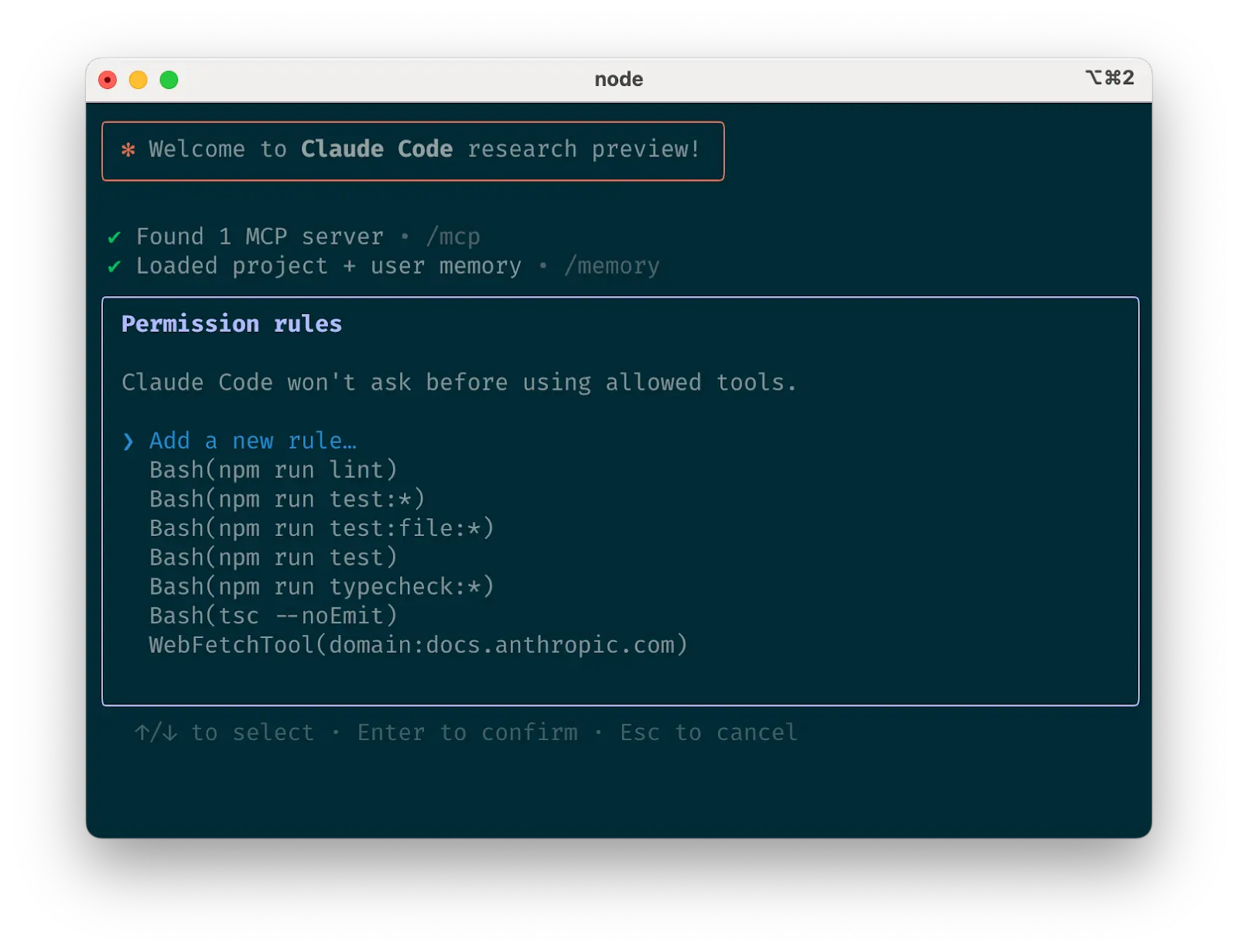
Claude Code tool allowlist
c. Curate Claude’s list of allowed toolsc. 筛选 Claude 允许使用的工具列表
By default, Claude Code requests permission for any action that might modify your system: file writes, many bash commands, MCP tools, etc. We designed Claude Code with this deliberately conservative approach to prioritize safety. You can customize the allowlist to permit additional tools that you know are safe, or to allow potentially unsafe tools that are easy to undo (e.g., file editing, git commit).
默认情况下,Claude Code 会请求任何可能修改您系统的操作的权限:文件写入、许多 bash 命令、MCP 工具等。我们故意采用这种保守的设计方式来优先考虑安全性。您可以自定义允许列表,以允许您知道是安全的额外工具,或允许容易撤销的潜在不安全工具(例如,文件编辑、 git commit )。
There are four ways to manage allowed tools:
管理允许工具有四种方法:
- Select “Always allow” when prompted during a session.
在会话期间提示时选择“始终允许”。 - Use the
/permissionscommand after starting Claude Code to add or remove tools from the allowlist. For example, you can addEditto always allow file edits,Bash(git commit:*)to allow git commits, ormcp__puppeteer__puppeteer_navigateto allow navigating with the Puppeteer MCP server.
启动 Claude Code 后使用/permissions命令向允许列表中添加或删除工具。例如,您可以添加Edit以始终允许文件编辑,添加Bash(git commit:*)以允许 git 提交,或添加mcp__puppeteer__puppeteer_navigate以允许使用 Puppeteer MCP 服务器进行导航。 - Manually edit your
.claude/settings.jsonor~/.claude.json(we recommend checking the former into source control to share with your team).
手动编辑你的.claude/settings.json或~/.claude.json(我们推荐将前者提交到源代码管理以与团队共享)。 - Use the
--allowedToolsCLI flag for session-specific permissions.
使用--allowedTools命令行标志设置会话特定的权限。
d. If using GitHub, install the gh CLId. 如果使用 GitHub,安装 gh 命令行工具
Claude knows how to use the gh CLI to interact with GitHub for creating issues, opening pull requests, reading comments, and more. Without gh installed, Claude can still use the GitHub API or MCP server (if you have it installed).
Claude 知道如何使用 gh 命令行工具与 GitHub 交互,用于创建问题、打开拉取请求、读取评论等。如果没有安装 gh ,Claude 仍然可以使用 GitHub API 或 MCP 服务器(如果你已安装)。
Claude has access to your shell environment, where you can build up sets of convenience scripts and functions for it just like you would for yourself. It can also leverage more complex tools through MCP and REST APIs.
Claude 可以访问您的 shell 环境,您可以在其中为它建立一系列方便的脚本和函数,就像您为自己建立的一样。它还可以通过 MCP 和 REST API 利用更复杂的工具。
a. Use Claude with bash toolsa. 使用 Claude 与 bash 工具
Claude Code inherits your bash environment, giving it access to all your tools. While Claude knows common utilities like unix tools and gh, it won’t know about your custom bash tools without instructions:
Claude Code 继承了你的 bash 环境,使其能够访问所有你的工具。虽然 Claude 知道常见的工具,如 unix 工具和 gh ,但它不会知道你的自定义 bash 工具,除非你提供说明:
- Tell Claude the tool name with usage examples
告诉 Claude 工具名称和使用示例 - Tell Claude to run
--helpto see tool documentation
告诉 Claude 运行--help查看工具文档 - Document frequently used tools in
CLAUDE.md
在CLAUDE.md中记录常用工具
b. Use Claude with MCPb. 使用 Claude 与 MCP 配合
Claude Code functions as both an MCP server and client. As a client, it can connect to any number of MCP servers to access their tools in three ways:
Claude Code 既充当 MCP 服务器也充当客户端。作为客户端,它可以连接到任意数量的 MCP 服务器,通过三种方式访问它们的工具:
- In project config (available when running Claude Code in that directory)
在项目配置中(在运行 Claude Code 的该目录下可用) - In global config (available in all projects)
在全局配置中(所有项目中均可用) - In a checked-in
.mcp.jsonfile (available to anyone working in your codebase). For example, you can add Puppeteer and Sentry servers to your.mcp.json, so that every engineer working on your repo can use these out of the box.
在一个已签入的.mcp.json文件(可供代码库中所有人员使用)。例如,你可以将 Puppeteer 和 Sentry 服务器添加到你的.mcp.json,这样你的仓库中每个工程师都可以直接使用这些工具。
When working with MCP, it can also be helpful to launch Claude with the --mcp-debug flag to help identify configuration issues.
在使用 MCP 时,也可以通过使用 --mcp-debug 标志来启动 Claude,以帮助识别配置问题。
c. Use custom slash commandsc. 使用自定义斜杠命令
For repeated workflows—debugging loops, log analysis, etc.—store prompt templates in Markdown files within the .claude/commands folder. These become available through the slash commands menu when you type /. You can check these commands into git to make them available for the rest of your team.
==对于重复的工作流程——调试循环、日志分析等——将提示模板存储在 .claude/commands 文件夹中的 Markdown 文件中。当你输入 / 时,这些模板会通过斜杠命令菜单变得可用。你可以将这些命令提交到 git,以便团队其他成员也能使用。==
Custom slash commands can include the special keyword $ARGUMENTS to pass parameters from command invocation.
自定义斜杠命令可以包含特殊关键字 $ARGUMENTS 来从命令调用中传递参数。
For example, here’s a slash command that you could use to automatically pull and fix a Github issue:
例如,这里是一个你可以用来自动拉取和修复一个 Github 问题的斜杠命令:
Putting the above content into .claude/commands/fix-github-issue.md makes it available as the /project:fix-github-issue command in Claude Code. You could then for example use /project:fix-github-issue 1234 to have Claude fix issue #1234. Similarly, you can add your own personal commands to the ~/.claude/commands folder for commands you want available in all of your sessions.
将上述内容放入 .claude/commands/fix-github-issue.md 中,使其作为 /project:fix-github-issue 命令在 Claude Code 中可用。例如,你可以使用 /project:fix-github-issue 1234 让 Claude 修复问题 #1234。类似地,你可以将你自己的个人命令添加到 ~/.claude/commands 文件夹中,以便在所有会话中都能使用这些命令。
3. Try common workflows 3. 尝试常见的工作流程
Claude Code doesn’t impose a specific workflow, giving you the flexibility to use it how you want. Within the space this flexibility affords, several successful patterns for effectively using Claude Code have emerged across our community of users:
Claude Code 没有强制特定的 workflows,为你提供了使用的灵活性。在这个灵活性所提供的空间内,我们的用户社区中已经出现了一些成功模式,有效地使用 Claude Code:
a. Explore, plan, code, commita. 探索、计划、编码、提交
This versatile workflow suits many problems:
这种多功能的工作流程适用于许多问题:
- Ask Claude to read relevant files, images, or URLs, providing either general pointers (“read the file that handles logging”) or specific filenames (“read logging.py”), but explicitly tell it not to write any code just yet.
让 Claude 读取相关的文件、图像或 URL,可以提供一般性指示(“读取处理日志的文件”)或具体文件名(“读取 logging.py”),但要明确告知它暂时不要编写任何代码。- This is the part of the workflow where you should consider strong use of subagents, especially for complex problems. Telling Claude to use subagents to verify details or investigate particular questions it might have, especially early on in a conversation or task, tends to preserve context availability without much downside in terms of lost efficiency.
这是工作流程中应考虑使用子代理的关键部分,特别是对于复杂问题。告诉 Claude 使用子代理来验证细节或调查它可能有的特定问题,尤其是在对话或任务初期,这有助于保持上下文可用性,而不会在效率上造成太大损失。
- This is the part of the workflow where you should consider strong use of subagents, especially for complex problems. Telling Claude to use subagents to verify details or investigate particular questions it might have, especially early on in a conversation or task, tends to preserve context availability without much downside in terms of lost efficiency.
- Ask Claude to make a plan for how to approach a specific problem. We recommend using the word “think” to trigger extended thinking mode, which gives Claude additional computation time to evaluate alternatives more thoroughly. These specific phrases are mapped directly to increasing levels of thinking budget in the system: “think” < “think hard” < “think harder” < “ultrathink.” Each level allocates progressively more thinking budget for Claude to use.
让 Claude 制定一个解决特定问题的计划。我们建议使用"思考"这个词来触发扩展思考模式,这会给 Claude 额外的计算时间,使其能更彻底地评估各种方案。这些具体短语直接映射到系统中思考预算的增加级别:"思考" < "努力思考" < "更努力思考" < "超思考"。每个级别为 Claude 分配了越来越多用于思考的预算。- If the results of this step seem reasonable, you can have Claude create a document or a GitHub issue with its plan so that you can reset to this spot if the implementation (step 3) isn’t what you want.
如果这一步的结果看起来合理,你可以让 Claude 创建一个文档或一个 GitHub 问题,包含它的计划,这样如果实施(步骤 3)不是你想要的结果,你就可以重置到这个位置。
- If the results of this step seem reasonable, you can have Claude create a document or a GitHub issue with its plan so that you can reset to this spot if the implementation (step 3) isn’t what you want.
- Ask Claude to implement its solution in code. This is also a good place to ask it to explicitly verify the reasonableness of its solution as it implements pieces of the solution.
让 Claude 用代码实现它的解决方案。这也是一个好时机,让 Claude 明确验证它的解决方案的合理性,在它逐步实施解决方案时。 - Ask Claude to commit the result and create a pull request. If relevant, this is also a good time to have Claude update any READMEs or changelogs with an explanation of what it just did.
让 Claude 提交结果并创建一个拉取请求。如果相关,这也是一个好时机,让 Claude 更新任何 README 或变更日志,解释它刚刚做了什么。
Steps 1-2 are crucial—without them, Claude tends to jump straight to coding a solution. While sometimes that’s what you want, asking Claude to research and plan first significantly improves performance for problems requiring deeper thinking upfront.
步骤 1-2 至关重要——没有它们,Claude 倾向于直接开始编写解决方案。虽然有时这正是你想要的,但让 Claude 先进行研究和计划,可以显著提高需要提前深入思考的问题的性能。
b. Write tests, commit; code, iterate, commitb. 编写测试,提交;编写代码,迭代,提交
This is an Anthropic-favorite workflow for changes that are easily verifiable with unit, integration, or end-to-end tests. Test-driven development (TDD) becomes even more powerful with agentic coding:
这是 Anthropic 推荐的一个工作流程,适用于可以通过单元测试、集成测试或端到端测试轻松验证的变更。在自主编程(agentic coding)中,测试驱动开发(TDD)变得更加强大:
- Ask Claude to write tests based on expected input/output pairs. Be explicit about the fact that you’re doing test-driven development so that it avoids creating mock implementations, even for functionality that doesn’t exist yet in the codebase.
让 Claude 根据预期的输入/输出对编写测试。明确说明你正在进行测试驱动开发,这样它就能避免创建模拟实现,即使代码库中尚未存在该功能。 - Tell Claude to run the tests and confirm they fail. Explicitly telling it not to write any implementation code at this stage is often helpful.
告诉 Claude 运行测试并确认它们失败。明确指示它在当前阶段不编写任何实现代码通常很有帮助。 - Ask Claude to commit the tests when you’re satisfied with them.
当你对测试满意时,让 Claude 提交这些测试。 - Ask Claude to write code that passes the tests, instructing it not to modify the tests. Tell Claude to keep going until all tests pass. It will usually take a few iterations for Claude to write code, run the tests, adjust the code, and run the tests again.
让 Claude 编写通过测试的代码,并指示它不要修改测试。告诉 Claude 一直进行下去,直到所有测试都通过。Claude 编写代码、运行测试、调整代码、再次运行测试通常需要几次迭代。- At this stage, it can help to ask it to verify with independent subagents that the implementation isn’t overfitting to the tests
在这个阶段,可以要求它通过独立的子代理来验证实现是否过度拟合测试
- At this stage, it can help to ask it to verify with independent subagents that the implementation isn’t overfitting to the tests
- Ask Claude to commit the code once you’re satisfied with the changes.
当你对更改满意后,请要求 Claude 提交代码。
Claude performs best when it has a clear target to iterate against—a visual mock, a test case, or another kind of output. By providing expected outputs like tests, Claude can make changes, evaluate results, and incrementally improve until it succeeds.
Claude 在有一个明确的迭代目标时表现最佳——一个视觉模型、一个测试用例或另一种类型的输出。通过提供预期的输出(如测试),Claude 可以进行更改、评估结果,并逐步改进直到成功。
c. Write code, screenshot result, iteratec. 编写代码,截图结果,迭代
Similar to the testing workflow, you can provide Claude with visual targets:
与测试工作流程类似,你可以向 Claude 提供视觉目标:
- Give Claude a way to take browser screenshots (e.g., with the Puppeteer MCP server, an iOS simulator MCP server, or manually copy / paste screenshots into Claude).
为 Claude 提供浏览器截图功能(例如,通过 Puppeteer MCP 服务器、iOS 模拟器 MCP 服务器,或手动复制/粘贴截图到 Claude)。 - Give Claude a visual mock by copying / pasting or drag-dropping an image, or giving Claude the image file path.
通过复制/粘贴或拖拽图片,或提供图片文件路径,为 Claude 创建视觉模型。 - Ask Claude to implement the design in code, take screenshots of the result, and iterate until its result matches the mock.
要求 Claude 在代码中实现设计,对结果进行截图,并迭代直到其结果与模型匹配。 - Ask Claude to commit when you’re satisfied.
当你满意时请让 Claude 提交。
Like humans, Claude’s outputs tend to improve significantly with iteration. While the first version might be good, after 2-3 iterations it will typically look much better. Give Claude the tools to see its outputs for best results.
像人类一样,Claude 的输出通常会随着迭代显著提升。虽然第一版可能不错,但经过 2-3 次迭代后通常会好很多。给 Claude 工具以查看其输出,以获得最佳效果。
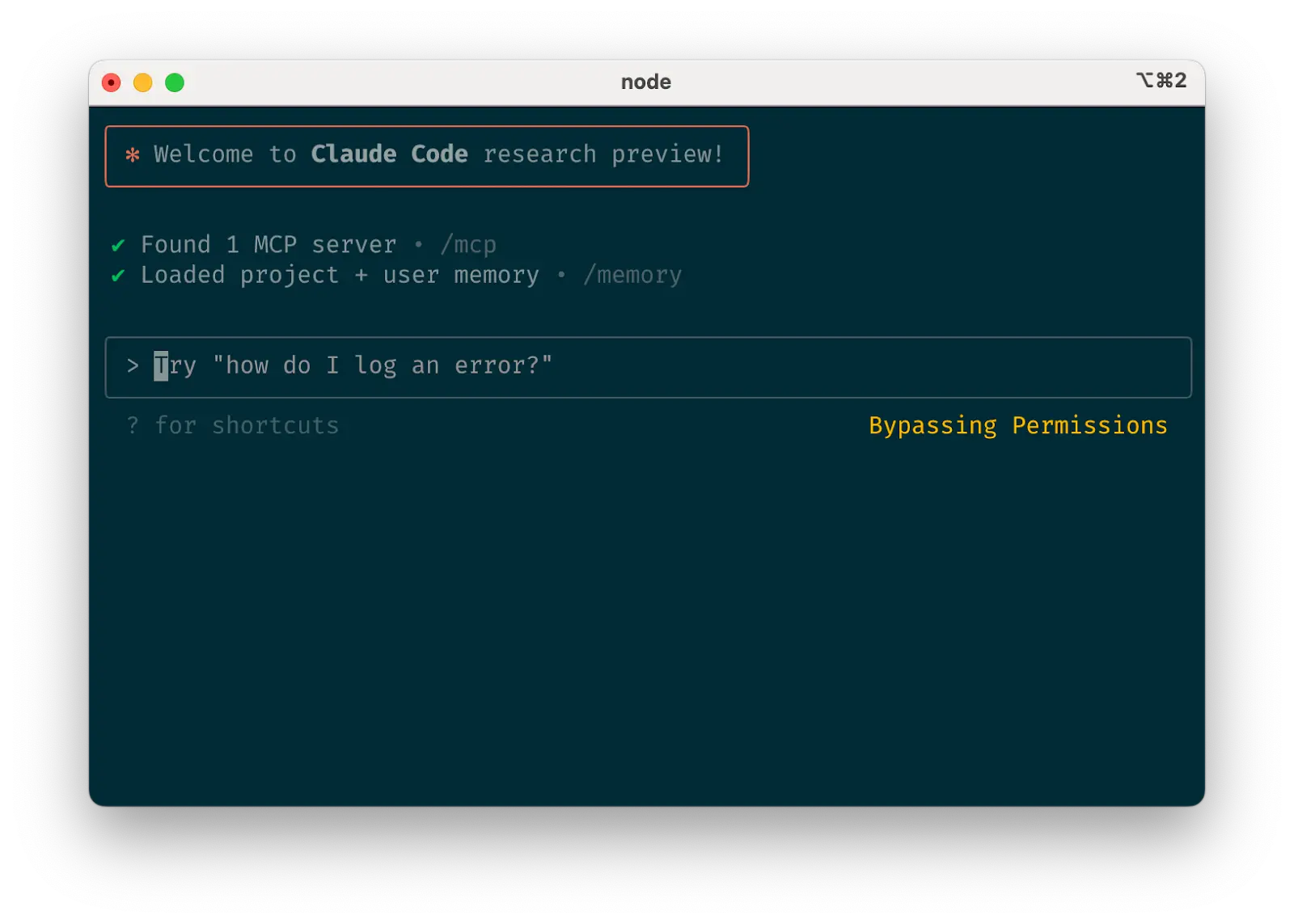
Safe yolo mode
d. Safe YOLO mode d. 安全 YOLO 模式
Instead of supervising Claude, you can use claude --dangerously-skip-permissions to bypass all permission checks and let Claude work uninterrupted until completion. This works well for workflows like fixing lint errors or generating boilerplate code.
与其监督 Claude,你可以使用 claude --dangerously-skip-permissions 绕过所有权限检查,让 Claude 无中断地工作直至完成。这对于修复 lint 错误或生成样板代码等工作流程效果很好。
Letting Claude run arbitrary commands is risky and can result in data loss, system corruption, or even data exfiltration (e.g., via prompt injection attacks). To minimize these risks, use --dangerously-skip-permissions in a container without internet access. You can follow this reference implementation using Docker Dev Containers.
让 Claude 执行任意命令是有风险的,可能导致数据丢失、系统损坏,甚至数据泄露(例如通过提示注入攻击)。为降低这些风险,请在无互联网访问的容器中使用 --dangerously-skip-permissions 。您可以参考使用 Docker Dev Containers 的示例实现。
e. Codebase Q&A e. 代码库问答
When onboarding to a new codebase, use Claude Code for learning and exploration. You can ask Claude the same sorts of questions you would ask another engineer on the project when pair programming. Claude can agentically search the codebase to answer general questions like:
在接入新的代码库时,使用 Claude Code 进行学习和探索。您可以像在结对编程时向项目中的其他工程师提问一样向 Claude 提问。Claude 可以主动搜索代码库来回答一般性问题,例如:
- How does logging work?日志如何工作?
- How do I make a new API endpoint?
如何创建一个新的 API 端点? - What does
async move { ... }do on line 134 offoo.rs?
async move { ... }在foo.rs的第 134 行上做什么? - What edge cases does
CustomerOnboardingFlowImplhandle?
CustomerOnboardingFlowImpl处理哪些边缘情况? - Why are we calling
foo()instead ofbar()on line 333?
为什么我们在第 333 行调用foo()而不是bar()? - What’s the equivalent of line 334 of
baz.pyin Java?
baz.py中第 334 行的 Java 等效代码是什么?
At Anthropic, using Claude Code in this way has become our core onboarding workflow, significantly improving ramp-up time and reducing load on other engineers. No special prompting is required! Simply ask questions, and Claude will explore the code to find answers.
在 Anthropic,以这种方式使用 Claude Code 已成为我们的核心入职流程,显著缩短了入职时间并减轻了其他工程师的负担。不需要特殊的提示!只需提问,Claude 就会探索代码以找到答案。
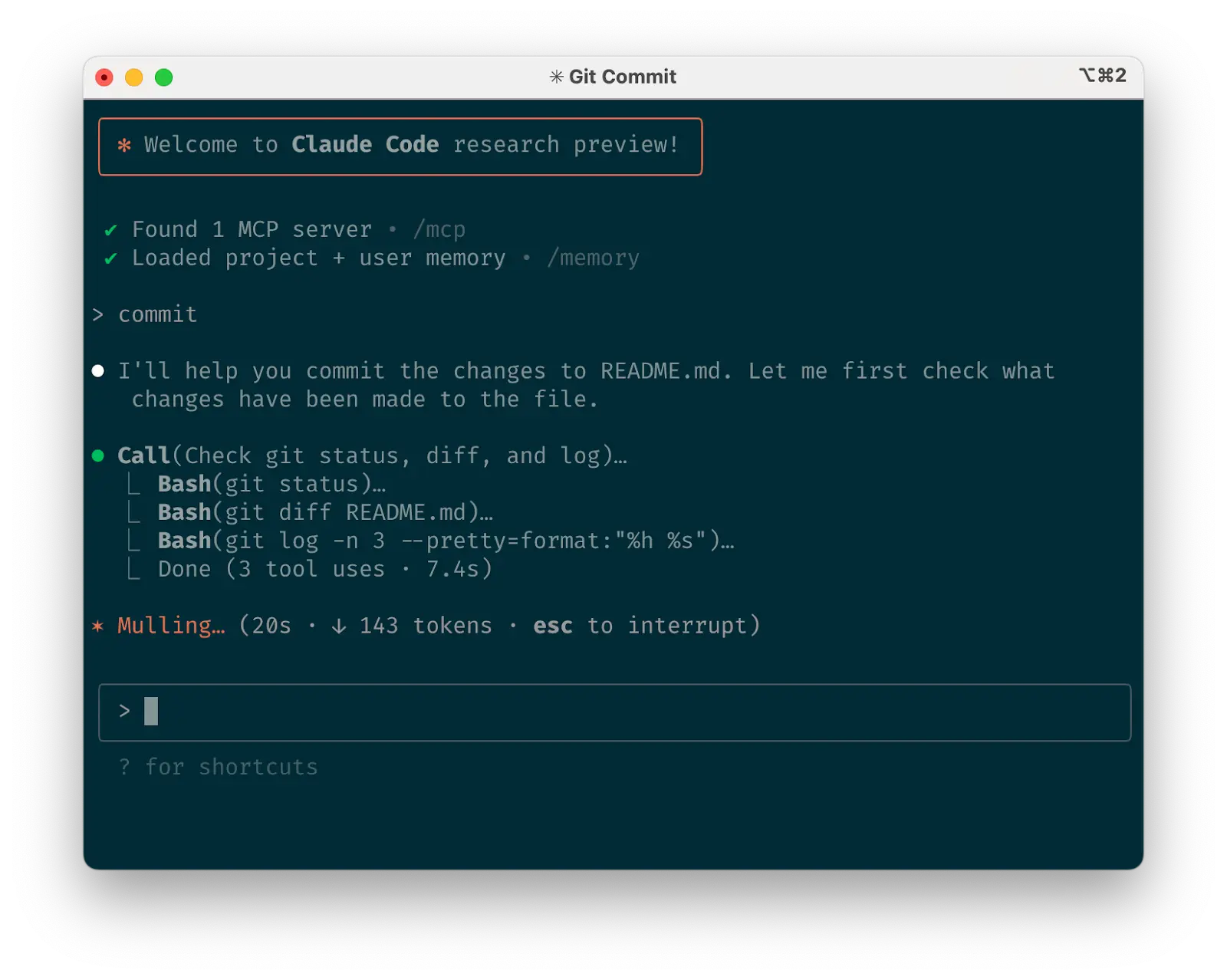
Use Claude to interact with git
f. Use Claude to interact with gitf. 使用 Claude 与 git 交互
Claude can effectively handle many git operations. Many Anthropic engineers use Claude for 90%+ of our git interactions:
Claude 可以有效地处理许多 git 操作。许多 Anthropic 工程师使用 Claude 进行 90%以上的 git 交互:
- Searching git history to answer questions like “What changes made it into v1.2.3?”, “Who owns this particular feature?”, or “Why was this API designed this way?” It helps to explicitly prompt Claude to look through git history to answer queries like these.
搜索 git 历史以回答诸如”哪些更改被纳入 v1.2.3 版本?”、“谁负责这个特定功能?“或”这个 API 为何这样设计?“等问题。这有助于明确提示 Claude 查看 git 历史来回答这类查询。 - Writing commit messages.Claude will look at your changes and recent history automatically to compose a message taking all the relevant context into account
编写提交信息。Claude 会自动查看您的更改和最近的历史记录,以编写考虑所有相关上下文的消息。 - Handling complex git operations like reverting files, resolving rebase conflicts, and comparing and grafting patches
处理复杂的 git 操作,如回退文件、解决变基冲突以及比较和嫁接补丁。
g. Use Claude to interact with GitHubg. 使用 Claude 与 GitHub 交互
Claude Code can manage many GitHub interactions:
Claude Code 可以管理许多 GitHub 交互:
- Creating pull requests: Claude understands the shorthand “pr” and will generate appropriate commit messages based on the diff and surrounding context.
创建拉取请求:Claude 理解简写 “pr”,并根据差异和周围上下文生成适当的提交信息。 - Implementing one-shot resolutions for simple code review comments: just tell it to fix comments on your PR (optionally, give it more specific instructions) and push back to the PR branch when it’s done.
为简单的代码审查评论实现单次解决:只需告诉它修复你的 PR 上的评论(可选,给出更具体的指示),完成后推回 PR 分支。 - Fixing failing builds or linter warnings
修复失败的构建或 linter 警告 - Categorizing and triaging open issues by asking Claude to loop over open GitHub issues
通过让 Claude 遍历 GitHub 上的开放问题来分类和分诊开放问题
This eliminates the need to remember gh command line syntax while automating routine tasks.
这消除了记住 gh 命令行语法的需要,同时自动化了常规任务。
h. Use Claude to work with Jupyter notebooksh. 使用 Claude 处理 Jupyter 笔记本
Researchers and data scientists at Anthropic use Claude Code to read and write Jupyter notebooks. Claude can interpret outputs, including images, providing a fast way to explore and interact with data. There are no required prompts or workflows, but a workflow we recommend is to have Claude Code and a .ipynb file open side-by-side in VS Code.
Anthropic 的研究人员和数据科学家使用 Claude Code 来读取和写入 Jupyter 笔记本。Claude 可以解释输出,包括图像,提供了一种快速探索和交互数据的方式。没有必需的提示或工作流程,但我们推荐的工作流程是在 VS Code 中并排打开 Claude Code 和一个 .ipynb 文件。
You can also ask Claude to clean up or make aesthetic improvements to your Jupyter notebook before you show it to colleagues. Specifically telling it to make the notebook or its data visualizations “aesthetically pleasing” tends to help remind it that it’s optimizing for a human viewing experience.
你也可以让 Claude 在你向同事展示 Jupyter 笔记本之前,帮你清理或进行美观改进。具体告诉它要使笔记本或其数据可视化“美观”,往往有助于提醒它正在为人类观看体验进行优化。
4. Optimize your workflow4. 优化你的工作流程
The suggestions below apply across all workflows:
以下建议适用于所有工作流程:
a. Be specific in your instructionsa. 指令要具体
Claude Code’s success rate improves significantly with more specific instructions, especially on first attempts. Giving clear directions upfront reduces the need for course corrections later.
Claude Code 的成功率随着更具体的指令而显著提高,尤其是在初次尝试时。提前给出清晰的指示可以减少后期需要进行的修正。
For example:例如:
| Poor 差 | Good 好 |
|---|---|
| add tests for foo.py 为 foo.py 添加测试 | write a new test case for foo.py, covering the edge case where the user is logged out. avoid mocks 为 foo.py 编写一个新的测试用例,覆盖用户登出时的边缘情况。避免使用模拟 |
| why does ExecutionFactory have such a weird api? ExecutionFactory 为什么有如此奇怪的 API? | look through ExecutionFactory’s git history and summarize how its api came to be 查看 ExecutionFactory 的 git 历史记录,总结其 API 是如何形成的 |
| add a calendar widget 添加日历小部件 | look at how existing widgets are implemented on the home page to understand the patterns and specifically how code and interfaces are separated out. HotDogWidget.php is a good example to start with. then, follow the pattern to implement a new calendar widget that lets the user select a month and paginate forwards/backwards to pick a year. Build from scratch without libraries other than the ones already used in the rest of the codebase. 查看主页上现有小部件的实现方式,以了解其模式,特别是代码和界面的分离方式。HotDogWidget.php 是一个很好的起点。然后,遵循该模式实现一个新的日历小部件,允许用户选择月份,并通过向前/向后分页选择年份。从零开始构建,仅使用代码库中已使用的库。 |
Claude can infer intent, but it can’t read minds. Specificity leads to better alignment with expectations.
Claude 可以推断意图,但它无法读心。具体性有助于更好地与预期保持一致。
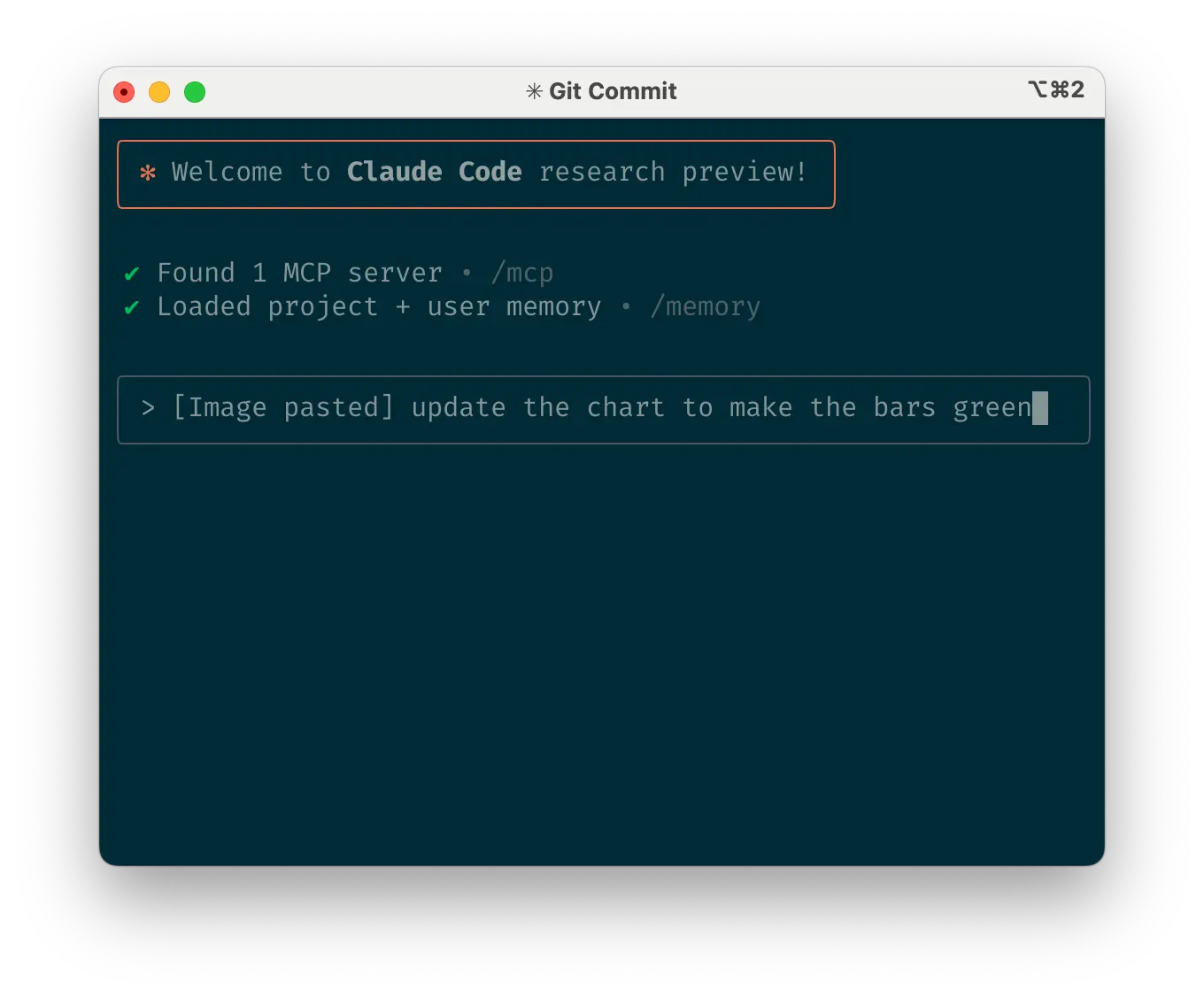
Give Claude images
b. Give Claude images b. 给 Claude 图片
Claude excels with images and diagrams through several methods:
Claude 在图像和图表方面通过多种方法表现出色:
- Paste screenshots (pro tip: hit cmd+ctrl+shift+4 in macOS to screenshot to clipboard and ctrl+v to paste. Note that this is not cmd+v like you would usually use to paste on mac and does not work remotely.)
粘贴截图(小技巧:在 macOS 中按下 cmd+ctrl+shift+4 进行截图并复制到剪贴板,然后按 ctrl+v 粘贴。注意这不同于通常在 mac 上粘贴时使用的 cmd+v,且无法远程操作。) - Drag and drop images directly into the prompt input
直接将图片拖放到提示输入框 - Provide file paths for images
提供图片的文件路径
This is particularly useful when working with design mocks as reference points for UI development, and visual charts for analysis and debugging. If you are not adding visuals to context, it can still be helpful to be clear with Claude about how important it is for the result to be visually appealing.
这在处理设计原型作为 UI 开发参考点以及用于分析和调试的视觉图表时特别有用。如果你没有向上下文中添加视觉元素,明确告知 Claude 结果需要具有视觉吸引力仍然很有帮助。
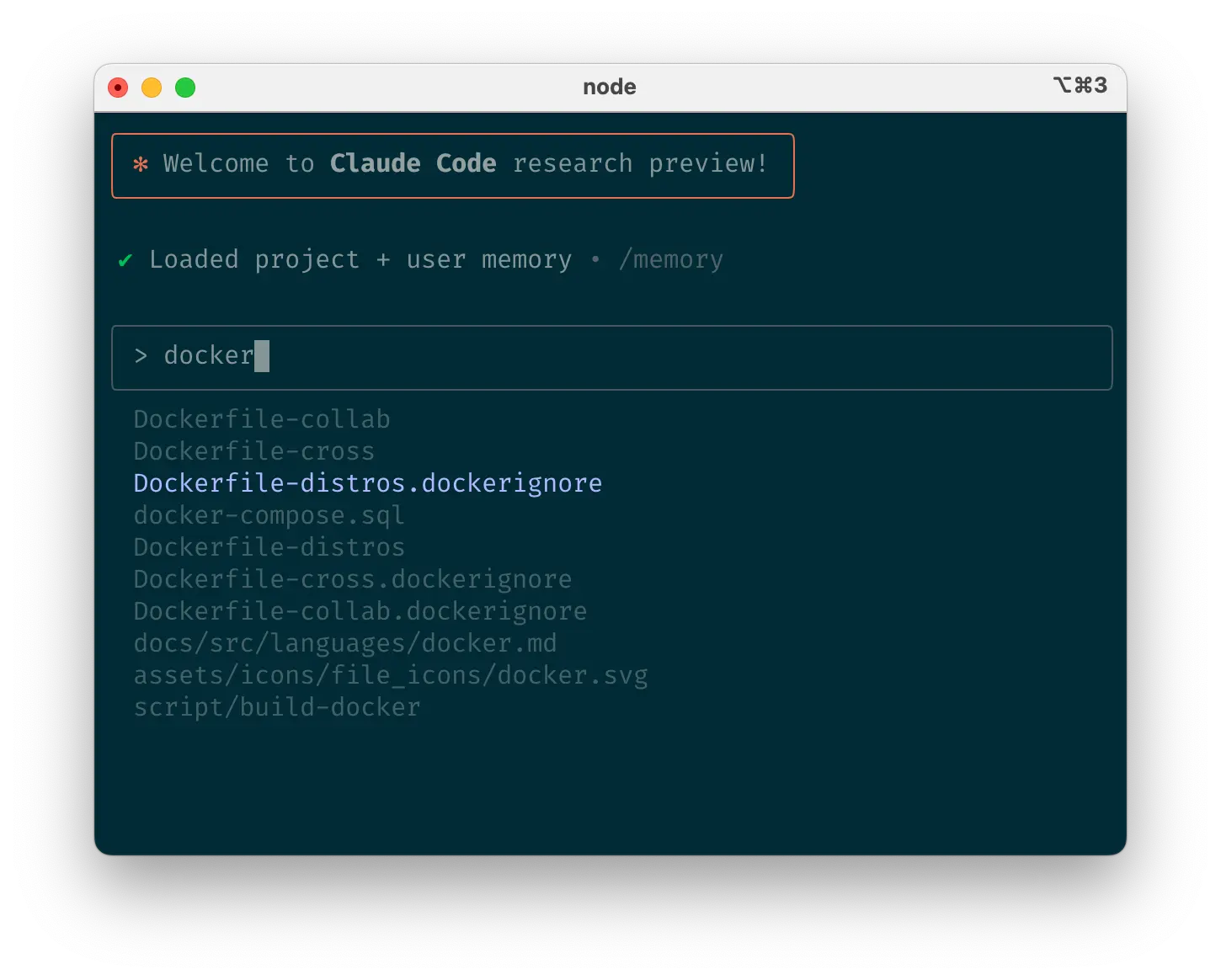
Mention files you want Claude to look at or work on
c. Mention files you want Claude to look at or work onc. 提及你想让 Claude 查看或处理的文件
Use tab-completion to quickly reference files or folders anywhere in your repository, helping Claude find or update the right resources.
使用 Tab 补全功能,可以快速在仓库中的任何位置引用文件或文件夹,帮助 Claude 找到或更新正确的资源。
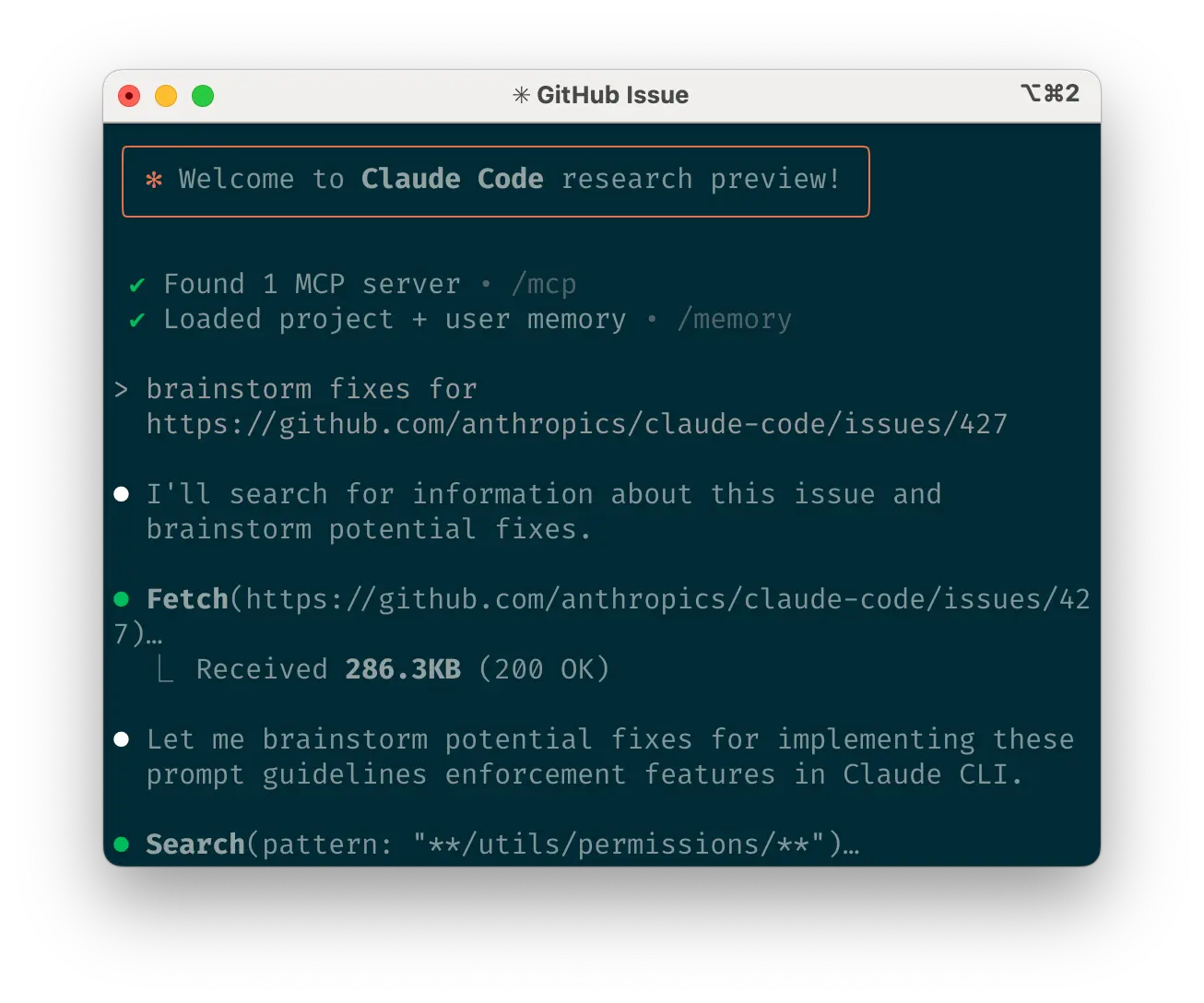
Give Claude URLs
d. Give Claude URLs d. 给 Claude 提供 URL
Paste specific URLs alongside your prompts for Claude to fetch and read. To avoid permission prompts for the same domains (e.g., docs.foo.com), use /permissions to add domains to your allowlist.
将特定的 URL 粘贴到你的提示旁边,让 Claude 获取并阅读。为了避免对相同域名的权限提示(例如,docs.foo.com),可以使用 /permissions 将域名添加到你的允许列表中。
e. Course correct early and oftene. 早期且频繁地修正方向
While auto-accept mode (shift+tab to toggle) lets Claude work autonomously, you’ll typically get better results by being an active collaborator and guiding Claude’s approach. You can get the best results by thoroughly explaining the task to Claude at the beginning, but you can also course correct Claude at any time.
虽然自动接受模式(按 shift+tab 切换)让 Claude 自主工作,但作为积极的合作者并引导 Claude 的方法通常能获得更好的结果。通过在开始时向 Claude 充分解释任务,你可以获得最佳结果,但你也可以随时修正 Claude 的方向。
These four tools help with course correction:
这四种工具有助于修正方向:
- Ask Claude to make a plan before coding. Explicitly tell it not to code until you’ve confirmed its plan looks good.
在编码前让 Claude 制定计划。明确告诉它,直到你确认它的计划看起来不错之前不要开始编码。 - Press Escape to interrupt Claude during any phase (thinking, tool calls, file edits), preserving context so you can redirect or expand instructions.
按下 Escape 键可在任何阶段(思考、工具调用、文件编辑)中断 Claude,保留上下文以便您重新引导或扩展指令。 - Double-tap Escape to jump back in history, edit a previous prompt, and explore a different direction. You can edit the prompt and repeat until you get the result you’re looking for.
双击 Escape 键可返回历史记录,编辑之前的提示,并探索不同方向。您可以编辑提示并重复操作,直到获得您想要的结果。 - Ask Claude to undo changes, often in conjunction with option #2 to take a different approach.
请 Claude 撤销更改,通常与选项 #2 结合使用以采取不同方法。
Though Claude Code occasionally solves problems perfectly on the first attempt, using these correction tools generally produces better solutions faster.
尽管 Claude Code 偶尔能一次性完美解决问题,但使用这些修正工具通常能更快地产生更好的解决方案。
f. Use /clear to keep context focusedf. 使用 /clear 来保持上下文聚焦
During long sessions, Claude’s context window can fill with irrelevant conversation, file contents, and commands. This can reduce performance and sometimes distract Claude. Use the /clear command frequently between tasks to reset the context window.
在==长时间会话中,Claude 的上下文窗口可能会被不相关的对话、文件内容和命令填满。这可能会降低性能,有时还会分散 Claude 的注意力。在任务之间频繁使用 /clear 命令来重置上下文窗口。==
g. Use checklists and scratchpads for complex workflowsg. 使用清单和草稿板处理复杂工作流
For large tasks with multiple steps or requiring exhaustive solutions—like code migrations, fixing numerous lint errors, or running complex build scripts—improve performance by having Claude use a Markdown file (or even a GitHub issue!) as a checklist and working scratchpad:
对于包含多个步骤或需要详尽解决方案的大型任务——例如代码迁移、修复多个代码风格错误或运行复杂的构建脚本——通过让 Claude 使用 Markdown 文件(甚至是一个 GitHub 问题!)作为清单和工作草稿板来提高性能:
For example, to fix a large number of lint issues, you can do the following:
例如,要修复大量 lint 问题,你可以这样做:
- Tell Claude to run the lint command and write all resulting errors (with filenames and line numbers) to a Markdown checklist
让 Claude 运行 lint 命令,并将所有结果错误(包括文件名和行号)写入 Markdown 清单 - Instruct Claude to address each issue one by one, fixing and verifying before checking it off and moving to the next
指示 Claude 逐个处理每个问题,在勾选前先修复并验证,然后移至下一个问题
h. Pass data into Claudeh. 将数据传递给 Claude
Several methods exist for providing data to Claude:
提供数据给 Claude 有几种方法:
- Copy and paste directly into your prompt (most common approach)
直接复制粘贴到你的提示中(最常见的方法) - Pipe into Claude Code (e.g.,
cat foo.txt | claude), particularly useful for logs, CSVs, and large data
通过管道输入到 Claude Code(例如,cat foo.txt | claude),特别适用于日志、CSV 文件和大量数据 - Tell Claude to pull data via bash commands, MCP tools, or custom slash commands
告诉 Claude 通过 bash 命令、MCP 工具或自定义斜杠命令来获取数据 - Ask Claude to read files or fetch URLs (works for images too)
让 Claude 读取文件或获取 URL(对图片也有效)
Most sessions involve a combination of these approaches. For example, you can pipe in a log file, then tell Claude to use a tool to pull in additional context to debug the logs.
大多数会话都涉及这些方法的组合。例如,你可以将日志文件输入管道,然后告诉 Claude 使用工具获取额外的上下文来调试日志。
5. Use headless mode to automate your infra5. 使用无头模式自动化你的基础设施
Claude Code includes headless mode for non-interactive contexts like CI, pre-commit hooks, build scripts, and automation. Use the -p flag with a prompt to enable headless mode, and --output-format stream-json for streaming JSON output.
Claude Code 包括用于非交互式环境(如 CI、预提交钩子、构建脚本和自动化)的无头模式。使用 -p 标志与提示文本来启用无头模式,并使用 --output-format stream-json 用于流式传输 JSON 输出。
Note that headless mode does not persist between sessions. You have to trigger it each session.
注意,无头模式不会在会话之间持续。你必须在每个会话中触发它。
a. Use Claude for issue triagea. 使用 Claude 进行问题筛选
Headless mode can power automations triggered by GitHub events, such as when a new issue is created in your repository. For example, the public Claude Code repository uses Claude to inspect new issues as they come in and assign appropriate labels.
无头模式可以驱动由 GitHub 事件触发的自动化操作,例如当你的仓库中创建新问题时。例如,公共的 Claude Code 仓库使用 Claude 来检查新到的问题并分配适当的标签。
b. Use Claude as a linterb. 使用 Claude 作为代码检查工具
Claude Code can provide subjective code reviews beyond what traditional linting tools detect, identifying issues like typos, stale comments, misleading function or variable names, and more.
Claude Code 可以提供传统代码检查工具无法检测到的主观代码审查,识别诸如拼写错误、过时注释、误导性的函数或变量名等问题。
6. Uplevel with multi-Claude workflows6. 使用多 Claude 工作流程提升效率
Beyond standalone usage, some of the most powerful applications involve running multiple Claude instances in parallel:
除了独立使用,一些最强大的应用涉及并行运行多个 Claude 实例:
a. Have one Claude write code; use another Claude to verifya. 让一个 Claude 编写代码;使用另一个 Claude 进行验证
A simple but effective approach is to have one Claude write code while another reviews or tests it. Similar to working with multiple engineers, sometimes having separate context is beneficial:
一种简单而有效的方法是让一个 Claude 编写代码,而另一个 Claude 进行审查或测试。这类似于与多个工程师合作,有时分开处理上下文是有益的:
- Use Claude to write code
使用 Claude 编写代码 - Run
/clearor start a second Claude in another terminal
运行/clear或在另一个终端启动第二个 Claude - Have the second Claude review the first Claude’s work
让第二个 Claude 审查第一个 Claude 的工作 - Start another Claude (or
/clearagain) to read both the code and review feedback
启动另一个 Claude(或再次使用/clear)来阅读代码和反馈意见 - Have this Claude edit the code based on the feedback
让这个 Claude 根据反馈意见编辑代码
You can do something similar with tests: have one Claude write tests, then have another Claude write code to make the tests pass. You can even have your Claude instances communicate with each other by giving them separate working scratchpads and telling them which one to write to and which one to read from.
你可以用类似的方式处理测试:让一个 Claude 编写测试,然后让另一个 Claude 编写代码使测试通过。你甚至可以让你的 Claude 实例相互沟通,方法是给它们分别提供工作用的草稿板,并告诉它们要写入哪个草稿板以及从哪个草稿板读取。
This separation often yields better results than having a single Claude handle everything.
这种分离通常比让单个 Claude 处理所有事情得到更好的结果。
b. Have multiple checkouts of your repob. 对你的仓库进行多次签出
Rather than waiting for Claude to complete each step, something many engineers at Anthropic do is:
与其等待 Claude 完成每一步,Anthropic 的许多工程师会这样做:
- Create 3-4 git checkouts in separate folders
在不同的文件夹中创建 3-4 个 git checkout - Open each folder in separate terminal tabs
在不同的终端标签页中打开每个文件夹 - Start Claude in each folder with different tasks
在每个文件夹中以不同的任务启动 Claude - Cycle through to check progress and approve/deny permission requests
循环检查进度并批准/拒绝权限请求
c. Use git worktrees c. 使用 git worktrees
This approach shines for multiple independent tasks, offering a lighter-weight alternative to multiple checkouts. Git worktrees allow you to check out multiple branches from the same repository into separate directories. Each worktree has its own working directory with isolated files, while sharing the same Git history and reflog.
这种方法在处理多个独立任务时表现出色,为多个签出提供了更轻量级的替代方案。Git worktrees 允许你从同一仓库签出多个分支到不同的目录中。每个 worktree 拥有自己的工作目录和隔离的文件,同时共享相同的 Git 历史记录和 reflog。
Using git worktrees enables you to run multiple Claude sessions simultaneously on different parts of your project, each focused on its own independent task. For instance, you might have one Claude refactoring your authentication system while another builds a completely unrelated data visualization component. Since the tasks don’t overlap, each Claude can work at full speed without waiting for the other’s changes or dealing with merge conflicts:
使用 git worktrees 使你能够在项目的不同部分同时运行多个 Claude 会话,每个会话专注于自己的独立任务。例如,你可能有一个 Claude 在重构你的认证系统,而另一个则构建一个完全无关的数据可视化组件。由于任务不会重叠,每个 Claude 都可以全速工作,无需等待另一个的更改或处理合并冲突:
- Create worktrees:
git worktree add ../project-feature-a feature-a创建工作树:git worktree add ../project-feature-a feature-a - Launch Claude in each worktree:
cd ../project-feature-a && claude
在每个工作树中启动 Claude:cd ../project-feature-a && claude - Create additional worktrees as needed (repeat steps 1-2 in new terminal tabs)
根据需要创建额外的工作树(在新终端标签中重复步骤 1-2)
Some tips:一些提示:
- Use consistent naming conventions
使用一致的命名规范 - Maintain one terminal tab per worktree
每个工作区使用一个终端标签页 - If you’re using iTerm2 on Mac, set up notifications for when Claude needs attention
如果你在 Mac 上使用 iTerm2,为 Claude 需要关注时设置通知 - Use separate IDE windows for different worktrees
为不同的工作区使用单独的 IDE 窗口 - Clean up when finished:
git worktree remove ../project-feature-a
完成时清理:git worktree remove ../project-feature-a
d. Use headless mode with a custom harnessd. 使用自定义的 harness 以无头模式运行
claude -p (headless mode) integrates Claude Code programmatically into larger workflows while leveraging its built-in tools and system prompt. There are two primary patterns for using headless mode:
claude -p (无头模式)通过编程将 Claude Code 集成到更大的工作流程中,同时利用其内置工具和系统提示。使用无头模式主要有两种模式:
1. Fanning out handles large migrations or analyses (e.g., analyzing sentiment in hundreds of logs or analyzing thousands of CSVs):
1. 分散式处理大型迁移或分析(例如,分析数百条日志中的情感或分析数千个 CSV 文件):
- Have Claude write a script to generate a task list. For example, generate a list of 2k files that need to be migrated from framework A to framework B.
让 Claude 编写一个脚本来生成任务列表。例如,生成一个需要从框架 A 迁移到框架 B 的 2k 文件列表。 - Loop through tasks, calling Claude programmatically for each and giving it a task and a set of tools it can use. For example:
claude -p “migrate foo.py from React to Vue. When you are done, you MUST return the string OK if you succeeded, or FAIL if the task failed.” --allowedTools Edit Bash(git commit:*)
遍历任务,为每个任务调用 Claude,并给它一个任务和一组它可以使用的工具。例如:claude -p “migrate foo.py from React to Vue. When you are done, you MUST return the string OK if you succeeded, or FAIL if the task failed.” --allowedTools Edit Bash(git commit:*) - Run the script several times and refine your prompt to get the desired outcome.
运行脚本几次,并优化你的提示词以获得期望的结果。
2. Pipelining integrates Claude into existing data/processing pipelines:
2. 管道化将 Claude 集成到现有的数据/处理管道中:
- Call
claude -p “<your prompt>” --json | your_command, whereyour_commandis the next step of your processing pipeline
调用claude -p “<your prompt>” --json | your_command,其中your_command是你处理流程的下一步 - That’s it! JSON output (optional) can help provide structure for easier automated processing.
就这样!JSON 输出(可选)可以帮助提供结构,以便更轻松地自动处理。
For both of these use cases, it can be helpful to use the --verbose flag for debugging the Claude invocation. We generally recommend turning verbose mode off in production for cleaner output.
对于这两种用例,使用 --verbose 标志来调试 Claude 调用可能会有所帮助。我们通常建议在生产环境中关闭详细模式,以获得更干净的输出。
What are your tips and best practices for working with Claude Code? Tag @AnthropicAI so we can see what you’re building!
你在使用 Claude Code 时有什么技巧和最佳实践?标签 @AnthropicAI ,这样我们就能看到你在构建什么!
Acknowledgements 致谢
Written by Boris Cherny. This work draws upon best practices from across the broader Claude Code user community, whose creative approaches and workflows continue to inspire us. Special thanks also to Daisy Hollman, Ashwin Bhat, Cat Wu, Sid Bidasaria, Cal Rueb, Nodir Turakulov, Barry Zhang, Drew Hodun and many other Anthropic engineers whose valuable insights and practical experience with Claude Code helped shape these recommendations.
由 Boris Cherny 撰写。这项工作借鉴了 Claude Code 更广泛用户社区中的最佳实践,这些社区的创新方法和工作流程持续激励着我们。特别感谢 Daisy Hollman、Ashwin Bhat、Cat Wu、Sid Bidasaria、Cal Rueb、Nodir Turakulov、Barry Zhang、Drew Hodun 以及其他许多 Anthropic 工程师,他们的宝贵见解和 Claude Code 的实践经验帮助塑造了这些建议。

Looking to learn more? 想了解更多?
Master API development, Model Context Protocol, and Claude Code with courses on Anthropic Academy. Earn certificates upon completion.
通过 Anthropic 学院上的课程掌握 API 开发、模型上下文协议和 Claude Code,完成课程后可获证书。